Birth Announcement Card Template 8: Integrating High-Resolution PSD Assets into Your Creative Workflow
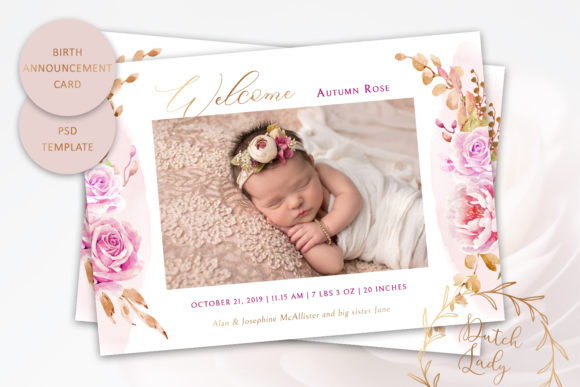
Integrating professional design assets into personal or client workflows requires a balance of aesthetic quality and technical precision. Birth Announcement Card Template 8 serves as a specialized resource within this ecosystem, offering a structured foundation for creating single-sided announcements without the time investment required for building layouts from scratch. For professionals, creators, and small business owners managing stationery services, this template functions as a high-fidelity starting point that bridges the gap between conceptualization and print-ready production. Understanding its specific technical parameters and customization capabilities is essential for maintaining efficiency and ensuring the final output meets professional printing standards.
Technical Specifications and Asset Management
Before initiating any design work, it is critical to verify that your current software environment supports the asset's architecture. Birth Announcement Card Template 8 is delivered as a layered Photoshop .PSD file at 300 dpi, which is the industry standard for high-quality offset and digital printing. The product dimensions are set to 7 x 5 inches, adhering to US standard postcard sizing. This specific dimension is strategic; it maximizes visual impact while remaining compliant with standard postal regulations for mailing without additional surcharges, streamlining the logistics phase of your announcement project.
A vital compatibility note must be addressed during the preparation phase: this file is NOT COMPATIBLE with Photoshop Elements. Users must have access to the full version of Adobe Photoshop to utilize the layer structure effectively. Attempting to open this file in Elements or other raster editors may result in missing layers, flattened images, or an inability to edit text and color overlays. For freelancers and agencies managing multiple design tools, verifying this requirement prevents workflow bottlenecks and ensures you can access all customizable elements immediately upon download.
Layer Structure and Customization Boundaries
Efficient editing relies on understanding what can and cannot be altered. This template offers extensive flexibility for typography and structural colors, but it maintains fixed artistic elements to preserve design integrity. You have full control over text attributes, including color, size, position, and font family. The inclusion of original font files eliminates the common friction point of hunting for typefaces or dealing with licensing issues mid-project. This allows for immediate text replacement and typographic hierarchy adjustments that align with your specific branding or personal style.
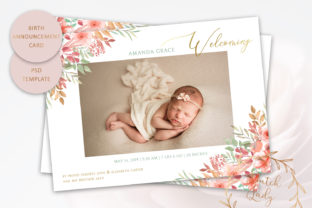
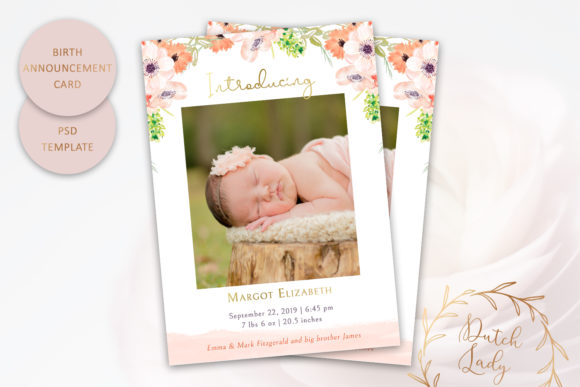
Furthermore, the background and border elements are fully customizable. This capability allows designers to adapt the card’s mood to match nursery themes, seasonal palettes, or corporate brand guidelines for business-related announcements. However, users must note that the watercolor floral illustrations CAN NOT be changed in color. These artistic assets are baked into the design as static elements. Recognizing this constraint early in the selection process is crucial. If your workflow requires recoloring every illustrative element to match a specific hex code, this template may not be suitable. Conversely, if you seek a cohesive, pre-designed artistic backdrop that anchors the layout, this limitation actually serves as a quality control feature, ensuring the watercolor rendering remains consistent and professionally balanced.
Workflow Integration: Pre-Production to Final Output
Incorporating Birth Announcement Card Template 8 into a broader creative process involves distinct phases of preparation, execution, and quality assurance. Whether you are designing for your own family or providing services to clients, treating the template as a component within a larger system yields better results than viewing it as an isolated task.
Preparation and Content Gathering
Before opening the PSD file, consolidate all variable content. In professional workflows, this includes verifying spelling, birth statistics, and photo resolution. Because the template is 300 dpi, any photographs inserted must also meet this resolution threshold at the intended print size to avoid pixelation. Organizing these assets in a dedicated folder linked to the PSD prevents broken links and streamlines the revision process. For entrepreneurs offering announcement services, creating a standardized intake form for client data reduces back-and-forth communication and ensures the customization phase focuses purely on design execution rather than data verification.
Execution and Typographic Hierarchy
Once the file is open in Photoshop, begin by adjusting the global colors for backgrounds and borders to establish the visual tone. Since the floral elements are fixed, select background hues that complement rather than compete with the existing artwork. Utilize the included font files to establish a clear hierarchy. Typically, the infant’s name should carry the most visual weight, followed by the date and time, with secondary details like weight and height styled in smaller, supporting typefaces. The ability to customize text position allows you to accommodate varying name lengths or longer messages without breaking the layout’s balance. Smart Guides and alignment tools in Photoshop should be used rigorously to maintain the professional spacing established in the original template design.
Quality Control and Export Protocols
The final stage of the workflow ensures technical accuracy before printing. Always proofread the customized text against the original source data. Check that all editable text layers have been reviewed and that no placeholder text remains. When exporting, save a master PSD with all layers intact for future edits or reprints. Create a separate, flattened PDF or high-resolution JPEG for the printer. Verify that the document remains at 7 x 5 inches and 300 dpi throughout the export process. If sending to a professional print shop, confirm their preferred color profile (usually CMYK) and convert accordingly, as RGB colors in the PSD may shift when printed. This systematic approach to quality control minimizes costly reprint errors and ensures the final physical product matches the digital proof.
Strategic Applications for Professionals and Creators
Beyond personal use, Birth Announcement Card Template 8 holds significant value for various professional workflows. Photographers often bundle announcement cards with newborn session packages. Using a high-quality, layered PSD template allows photographers to offer a premium stationery add-on without hiring a separate graphic designer. The 7 x 5 inch format pairs perfectly with standard photo prints, making it easy to create cohesive deliverables.
For Etsy sellers and stationery entrepreneurs, this template can serve as a base for semi-custom product listings. By keeping the floral art constant and offering customizable text and background colors, you can create a signature collection that is recognizable yet adaptable. This reduces the per-order design time significantly compared to fully custom work, improving profit margins and turnaround times. Educators and bloggers focusing on design or parenting niches can also utilize the template to demonstrate Photoshop techniques, layer management, or print preparation processes, using the fixed floral elements as a teaching anchor for color theory and typography placement.
Long-Term Usability and File Organization
To maximize the return on investment for this asset, implement a robust file organization strategy. Rename the master file clearly, such as "Birth_Announcement_Template8_Master.psd," and store it in a central design assets library. Keep the included font files in a dedicated subfolder or install them permanently in your system to prevent missing font warnings in future sessions. Documenting the specific limitations regarding the non-editable florals in your internal asset database helps team members or future collaborators understand the template’s scope without needing to reverse-engineer the file.
Consider how this template interacts with other resources in your toolkit. It pairs well with matching envelope templates, social media announcement formats, or thank-you card designs. While this specific asset is single-sided, it can be part of a larger suite where the reverse side utilizes a complementary template. Maintaining consistency across these touchpoints strengthens brand identity for businesses and creates a polished, thoughtful experience for personal users. By treating Birth Announcement Card Template 8 as a modular component within a comprehensive design system, you ensure it remains a reliable, efficient tool for years to come, adapting to new projects while maintaining high standards of visual and technical quality.