PSD Graduation Announcement Card Template Guide
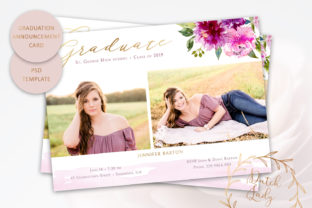
Celebrating an academic milestone requires stationery that balances formal achievement with personal warmth. A PSD Graduation Announcement Card Template serves as the foundational tool for creating announcements that feel bespoke rather than generic. This specific layered Photoshop file offers a structured yet flexible canvas, allowing designers, graduates, and small business owners to craft professional-grade stationery without starting from scratch. The value lies in the intersection of technical precision and artistic freedom, providing a high-resolution base that respects both print standards and creative expression.
Technical Foundation for Professional Results
The effectiveness of any printed announcement depends entirely on the quality of the source file. This template is engineered at 300 dpi, ensuring that every edge remains crisp and every color transition stays smooth when transferred to physical paper. The dimensions adhere to the US standard postcard size of 7 x 5 inches, a format chosen specifically for its versatility. It is large enough to display detailed typography and watercolor illustrations prominently, yet compact enough to qualify for standard postcard mailing rates in many regions.
For creators and marketers managing multiple graduation announcements, the layered .PSD structure is essential. Unlike flattened image files, this template separates text, backgrounds, borders, and decorative elements into distinct layers. This organization allows for non-destructive editing. You can adjust the opacity of a border, shift the position of a text block, or completely rewrite content without affecting the underlying artwork. The inclusion of proper bleed and trimming space further safeguards the production process, giving print shops the necessary margin to cut cards accurately without risking white edges or cropped content.
Navigating Customization Constraints and Freedoms
Understanding what can and cannot be altered is crucial for maintaining design integrity. This PSD Graduation Announcement Card Template offers extensive control over typographic and structural elements. Text color, size, and positioning are fully customizable, enabling you to match school colors, personal branding, or specific aesthetic themes. Backgrounds and borders also allow for complete color adjustment, providing a cohesive look across different graduation years or departments.
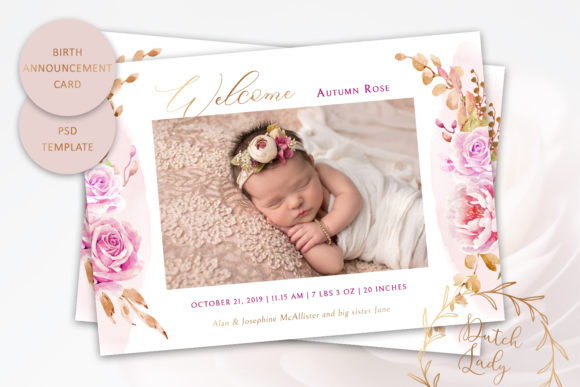
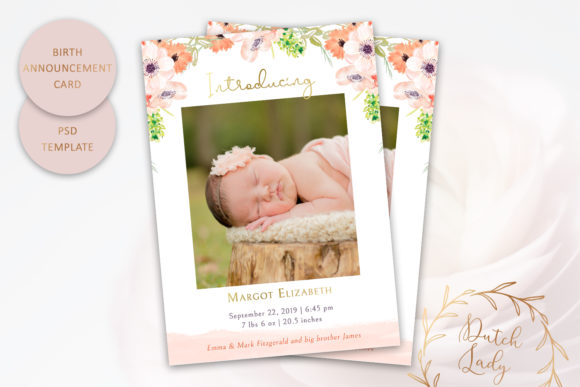
However, a key distinction exists regarding the watercolor floral illustrations. These artistic elements cannot be changed in color. This limitation is actually a feature of quality; it preserves the original hand-painted nuance and transparency that digital recoloring often destroys. Instead of forcing these florals to match a new palette, successful adaptation involves building your color scheme around them. Treat the illustration as the anchor of the design. Select background tints and font colors that complement the existing hues of the flowers, creating harmony rather than conflict. This approach ensures the final product retains the organic, artisanal feel intended by The Dutch Lady Designs.
Creative Applications Across Audiences
Different users require different outcomes from the same asset. The versatility of this template makes it applicable to various contexts beyond simple family announcements.
- Freelance Designers: Use this template as a premium offering for clients who need quick turnaround times without sacrificing quality. The included font files ensure you can deliver consistent results regardless of your local system setup, streamlining the client approval process.
- Educators and Institutions: Schools can adapt the template for departmental honors lists or faculty retirements. By keeping the floral anchor but adjusting the background to institutional navy or gold, the card transforms from a personal keepsake into official organizational correspondence.
- Small Business Owners: Stationery shops or Etsy sellers can utilize this as a base for semi-custom listings. Because the text is fully editable, you can offer personalized proofs rapidly while maintaining a consistent shop aesthetic.
- DIY Graduates: For those handling their own stationery, the template removes the guesswork of layout. You focus solely on wording and color selection, confident that the spacing and hierarchy are already professionally resolved.
Typography and Layout Strategy
Since font files are included with the template, you have immediate access to the specific typefaces chosen to pair with the watercolor art. When customizing, resist the urge to use every available style. Effective graduation announcements typically rely on a maximum of two or three typefaces: a script for names or headers, and a clean serif or sans-serif for logistical details like dates, locations, and degree information.
Consider the hierarchy of information. The graduate’s name should generally command the most visual weight. Use the template’s layering capabilities to create contrast through size and weight rather than excessive color variation. If the watercolor illustration occupies the top third of the card, align your primary text to create a balanced negative space below. For double-sided printing projects where this single-sided template is used for the front, ensure your back-side design utilizes similar margins and safe zones to maintain visual continuity when the card is flipped.
Preparing for Print Production
A common misconception among first-time buyers is that printing is included with digital templates. It is vital to understand that printing is not included. You are purchasing the digital master file, and production is a separate step handled by you. This separation allows for greater flexibility in paper choice and finish.
When selecting a print vendor, whether local or online, verify their specific file requirements. While this template includes adequate bleed, some printers require specific crop marks or color profiles (CMYK vs. RGB). Because the watercolor elements rely on subtle gradients, request a physical proof if ordering a large batch. Screen calibration varies significantly, and colors that appear vibrant on a backlit monitor may print darker or duller on uncoated cardstock. Opt for matte or linen finishes to enhance the watercolor aesthetic; glossy papers can sometimes make organic illustrations look artificial.
Maintaining Brand Consistency for Creators
For graphic designers and publishers using this PSD Graduation Announcement Card Template as part of a larger suite, consistency is key. Create a master copy of the template with your preferred color adjustments and logo placements saved separately. Never overwrite the original pristine file. This practice prevents accidental corruption of the non-editable floral layers and ensures you always have a clean baseline for future projects.
If adapting the design for digital platforms—such as social media announcements or email newsletters—resize the canvas proportionally. Do not simply crop the 7x5 inch file. Instead, scale the entire composition down to fit square or vertical social formats. This preserves the relationship between the text and the floral anchor points. Remember that screen resolution differs from print resolution; while the 300 dpi source is perfect for print, you may need to optimize the exported JPEG or PNG for web speed without losing legibility on mobile devices.
Sourcing with Confidence
In a marketplace saturated with unverified digital assets, provenance matters. This template is created by The Dutch Lady Designs, a registered graphic design company based in The Netherlands and listed with the Dutch Chamber of Commerce. This registration provides a layer of accountability often missing from anonymous marketplaces. When investing in creative assets for professional or commercial use, verifying the seller’s legitimacy protects your project from copyright ambiguities and ensures you receive support if technical issues arise with the layered file.
Ultimately, this template is a tool for translation. It translates the abstract pride of graduation into a tangible artifact. Whether you are a designer seeking efficiency, a marketer maintaining brand standards, or a graduate celebrating a hard-won degree, the PSD format empowers you to produce work that is technically sound and aesthetically resonant. By respecting the fixed nature of the watercolor art while leveraging the fluidity of the typographic layers, you create announcements that honor the occasion with appropriate gravity and beauty.