PSD Birth Announcement Card Template: A Practical Design Resource
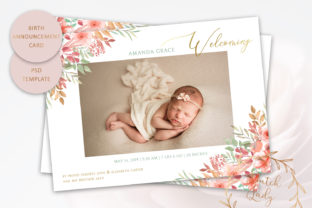
The arrival of a new family member is a significant milestone that warrants professional-quality communication. For parents, photographers, and small business owners in the stationery niche, the PSD Birth Announcement Card Template offers a structured solution for creating high-impact announcements without commissioning custom design work from scratch. This resource bridges the gap between generic online card builders and expensive bespoke graphic design services, providing a layered Photoshop file that balances aesthetic appeal with technical precision.
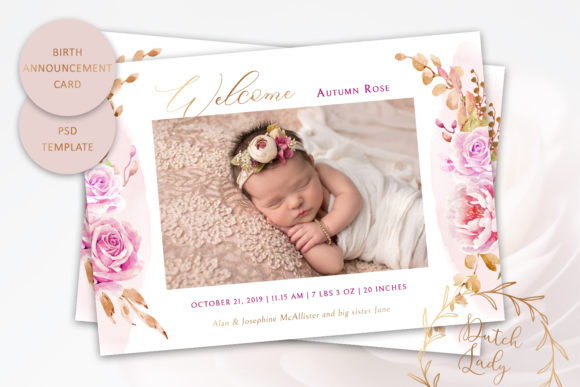
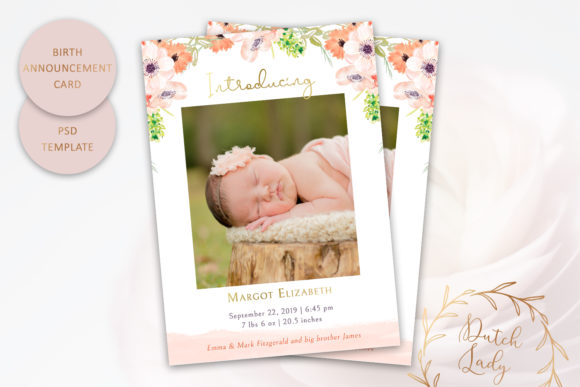
Evaluating this template requires looking beyond the visual preview to understand its functional utility. It is designed specifically for users who possess intermediate Adobe Photoshop skills and require print-ready assets. The product serves as a foundational layout where typography, color grading, and photo placement can be adjusted while maintaining a cohesive watercolor floral aesthetic. Understanding the technical specifications and practical limitations of this asset is essential for determining if it aligns with your specific production workflow and quality standards.
Technical Specifications and Print Readiness
The primary value proposition of any print template lies in its technical adherence to industry standards. This PSD Birth Announcement Card Template is engineered at 300 dpi, which is the non-negotiable benchmark for professional offset and digital printing. Lower resolution files often result in pixelation or blurriness when rendered on physical cardstock, but this specification ensures crisp text edges and smooth color gradients.
The dimensions are set to 7 x 5 inches, adhering to the US standard postcard size. This specific aspect ratio is strategic for several reasons:
- Postal Compliance: It fits within standard mailing categories without requiring oversized postage in many regions.
- Vendor Availability: Most professional print shops and online fulfillment centers offer pre-cut options for this size, reducing waste and cost.
- Visual Balance: The rectangular format provides ample negative space for photography alongside typographic details.
Crucially, the file includes adequate bleed and trimming space. In professional printing, artwork must extend beyond the final cut line to account for mechanical shifting during the guillotine process. Many amateur templates fail to include this safety margin, resulting in white borders or cropped content. This template’s inclusion of proper bleed zones indicates it was created with commercial production in mind, making it reliable for vendors who enforce strict file submission guidelines.
Customization Capabilities and Workflow Efficiency
Flexibility is the defining characteristic of a useful PSD template. This file is fully layered, allowing for granular control over the design elements. Users can modify text attributes including font family, size, tracking, leading, and color. This level of control is necessary for accommodating varying name lengths and ensuring readability against the background imagery.
The color customization extends to borders and background washes, enabling users to match specific nursery themes or brand palettes. However, a critical distinction must be made regarding the watercolor floral illustrations. These specific raster elements cannot be recolored within the PSD file. Unlike vector graphics, watercolor textures contain complex transparency and blending data that do not respond cleanly to hue/saturation adjustments. Prospective users should evaluate whether the existing floral palette complements their intended color scheme before purchase. If the florals clash with your desired aesthetic, no amount of layer styling will effectively correct them without degrading image quality.
The inclusion of original font files adds significant practical value. Licensing issues frequently plague template usage, as designers often use proprietary typefaces that end-users cannot legally access. By bundling the necessary fonts, this product eliminates the friction of sourcing alternatives or risking copyright infringement. This ensures the final output matches the designer’s original vision exactly, preserving the typographic hierarchy and spacing intended in the mockup.
Evaluating Real-World Application and Value
In practice, this PSD Birth Announcement Card Template performs best for users who understand the separation between design and production. It is important to note that printing services are not included. This is purely a digital asset. The user assumes responsibility for vendor selection, paper stock choice, and proofing. For professionals, this autonomy is a benefit; for novices, it represents an additional logistical step.
The long-term value of this template depends on usage frequency. For a single birth announcement, the cost-per-use is higher than a basic online editor. However, for freelance designers, photographers offering newborn packages, or stationery entrepreneurs, the ROI increases significantly. The ability to deploy a consistent, high-quality layout across multiple clients or products transforms this from a single-use item into a scalable business asset. The time saved on setting up guides, sourcing florals, and establishing typographic grids justifies the investment for repeat users.
Quality consistency is another strong point. Because the core artistic elements (the watercolors) are locked, the design maintains its integrity regardless of how much the text is altered. This prevents well-meaning but unskilled users from accidentally breaking the visual balance of the card. The template acts as a guardrail, ensuring that even with heavy customization, the final product retains a professional polish.
Target Audience and Suitability Assessment
Not every user will benefit equally from this resource. Based on its feature set and requirements, the PSD Birth Announcement Card Template is most suitable for specific demographics:
Ideal Users
- Graphic Designers and Freelancers: Professionals who need a reliable base layout to expedite client deliverables without sacrificing quality.
- Newborn Photographers: Creatives looking to offer value-added stationery products that complement their photographic style.
- Tech-Savvy Parents: Individuals with Photoshop proficiency who want total control over their announcement and prefer self-managed printing over restrictive web-to-print platforms.
- Small Stationery Business Owners: Entrepreneurs building a catalog of semi-custom designs who require commercial-grade source files.
Less Suitable Users
- Non-Designers Without Software: Those without Adobe Photoshop or equivalent compatibility cannot utilize this file.
- Users Requiring Vector Scalability: If you need to resize the card to billboard dimensions or alter the floral art itself, this raster-based template is insufficient.
- Those Seeking All-Inclusive Services: If you require design, printing, and envelope addressing in a single transaction, a dedicated stationery vendor is a better fit than a standalone template.
Professional Considerations for Implementation
When integrating this template into a workflow, attention to detail determines success. Always verify the color profile before sending to print. While the template is likely RGB for screen viewing, most commercial printers prefer CMYK. Converting profiles early allows you to adjust colors that may shift during translation, particularly in the vibrant watercolor regions. Additionally, test print on the actual intended paper stock before committing to a full run. Uncoated papers absorb ink differently than coated stocks, potentially muting the delicate watercolor details.
The credibility of the source matters in digital asset acquisition. The Dutch Lady Designs operates as a registered entity with the Dutch Chamber of Commerce. This verification provides a layer of trust often missing in anonymous marketplace listings. It suggests accountability regarding licensing, file integrity, and customer support. When purchasing creative assets, verifying the seller's business status is a prudent risk management strategy, especially for commercial users who must ensure they have valid licenses for resale or client work.
Ultimately, the PSD Birth Announcement Card Template represents a focused tool rather than a magic solution. Its effectiveness relies entirely on the user's ability to leverage its layered structure and adhere to print production standards. For those equipped with the right software and knowledge, it offers a streamlined path to elegant, professional announcements. For others, it serves as a benchmark of what to look for in quality design resources: proper resolution, standard sizing, included assets, and transparent limitations regarding editable elements.